Android APK and iOS PWA
Download the Noxino APK directly from the site on Android, or add the PWA shortcut to your iOS home screen - no app store required for either.
Everything About the App at Noxino Casino
Take slots, live casino tables from Evolution Gaming, and sports betting with you on Android or iOS. The full Noxino experience fits in your pocket.
The Full Casino in Your Pocket
Take slots, live casino tables from Evolution Gaming, and sports betting with you on Android or iOS. The full Noxino experience fits in your pocket.
Get the App 18+ only. Gambling can become addictive; play responsibly. Bonus terms apply.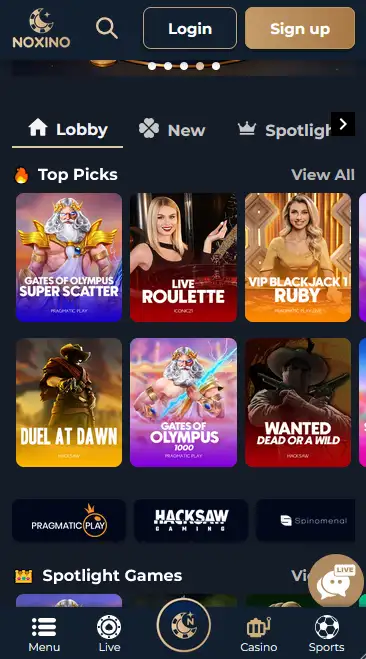
How to Get Started
Staying Safe in the App
What You Should Do
What You Should Avoid
Why Use the Noxino App
Android APK and iOS PWA
Download the Noxino APK directly from the site on Android, or add the PWA shortcut to your iOS home screen - no app store required for either.
Full Game Catalogue
Every slot from Pragmatic Play, NetEnt, Play'n GO and more, plus live tables from Evolution Gaming and Pragmatic Live, are available in the app.
Secure Transactions
Deposits and withdrawals via Visa, Mastercard, Skrill, Neteller, and cryptocurrency are protected by SSL encryption on every session.
Noxino App: What to Expect
Pros
Cons
Device Requirements
Android
iOS
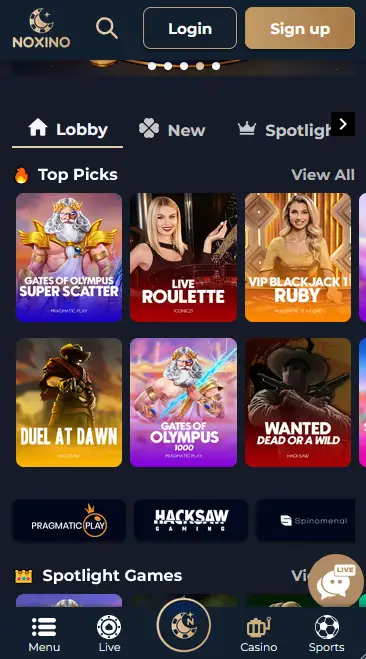
The Noxino app delivers the complete platform without compromise. Slots, live casino, sportsbook, cashier, and bonus management are all present in both the Android APK and the iOS PWA. There is no stripped-down mobile version: the same slots catalogue built on providers including Pragmatic Play, NetEnt, Play’n GO, Hacksaw Gaming, and BGaming is available in the app, alongside live dealer tables from Evolution Gaming and Pragmatic Live, and the full sportsbook with live and pre-match markets.
The app preserves every function a desktop player would expect. Slot play, including titles like Gates of Olympus (Pragmatic Play, RTP 96.5%), Dead or Alive 2 (NetEnt, RTP 96.8%), and Aviator (Spribe, RTP 97%), runs without quality reduction on a mobile screen. The cashier accepts Visa, Mastercard, Skrill, Neteller, and cryptocurrency, and the same account session covers both casino and sports, so switching between a slot and a football live-bet requires only a tap.
The Android APK is a standalone application that sits outside the browser environment, which means push notifications can be supported and navigation feels more native. The iOS PWA functions within the WebKit engine and is installed as a home screen shortcut rather than a system-level application, though the user experience in the casino and sportsbook is functionally equivalent.
The mobile slots library includes every major title from the full catalogue. Sweet Bonanza (Pragmatic Play, RTP 96.47%), Book of Dead (Play’n GO, RTP 96.21%), Starburst (NetEnt, RTP 96.1%), and Fruit Warp (Thunderkick, RTP 97%) all render natively in the mobile interface. Gonzo’s Quest from NetEnt (RTP 95.97%) and Dead or Alive 2 from NetEnt (RTP 96.8%) are available in demo mode as well as real-money play on supported accounts.
The full Evolution Gaming suite operates in the app, including Lightning Roulette, Crazy Time, Infinite Blackjack, Monopoly Live, and Deal or No Deal Live. Pragmatic Live contributes One Blackjack and Speed Baccarat to the live table roster. Both providers stream at standard quality, and the app interface scales the dealer view appropriately for portrait and landscape orientation.
RNG table games and progressive jackpot slots, including Mega Moolah (Microgaming, progressive jackpot, RTP 88.12%) and Divine Fortune (NetEnt, progressive jackpot, RTP 96.59%), are accessible within the app alongside the crash game Aviator (Spribe, RTP 97%).
The cashier inside the app supports the same methods as the desktop site, with no additional friction for mobile users.
| Method | Type |
|---|---|
| Visa | Debit card |
| Mastercard | Debit card |
| Skrill | E-wallet |
| Neteller | E-wallet |
| Bitcoin | Cryptocurrency |
| Ethereum | Cryptocurrency |
| Litecoin | Cryptocurrency |
| Bank Transfer | Direct banking |
| Method | Deposit | Withdrawal |
|---|---|---|
| Visa / Mastercard | Instant | 1-5 business days |
| Skrill / Neteller | Instant | Up to 24 hours |
| Cryptocurrency | Up to 30 minutes | Up to 24 hours |
| Bank Transfer | 1-3 business days | 3-7 business days |
All transactions processed through the Noxino app are protected by SSL encryption. Financial data is not stored locally on the device; all payment processing runs through the platform’s secured servers.
The Noxino mobile experience is available through two formats tailored to the two major mobile operating systems.
The Android option is a native APK downloaded directly from noxinobet.app. Because the file is distributed outside Google Play, installation requires enabling sideloading from unknown sources in Android device settings, which is a standard permission for apps not distributed through the Play Store. The minimum Android version required is confirmed on the app download page, as this may be updated as the APK is maintained. Storage space requirements are modest given the streaming nature of the games.
iOS players access Noxino through a Progressive Web App. The PWA is installed via Safari’s Add to Home Screen function, creating a full-screen shortcut on the iOS home screen that launches without a browser address bar or navigation controls, replicating the feel of a native application. No App Store listing exists for Noxino, and installation via any other browser on iOS may not produce the same full-screen result. The minimum iOS version requirement is stated on the site’s app page.
The requirements table in the specifications block above provides the current confirmed figures. Because both formats are updated periodically, check noxinobet.app for the latest version number before downloading.
Every connection between the Noxino app and the platform’s servers uses SSL encryption, protecting your credentials, financial information, and session data in transit. This applies equally to the Android APK and the iOS PWA.
Two-factor authentication is available through account settings and applies to mobile logins in exactly the same way as desktop logins. When enabled, a one-time code from your authenticator app or registered mobile number is required alongside your password to complete the sign-in process.
If your Android or iOS device supports fingerprint or face recognition and these are configured in your device settings, the browser or PWA session may allow biometric authentication for returning to the site after locking the screen, depending on your device’s own security configuration.
New players can complete the Noxino registration form directly within the app or PWA without needing to visit the desktop site first. Enter your personal details, confirm your email address, and your account is ready to use. The minimum age to register is 18. The casino welcome bonus of 100% plus 100 Free Spins activates on your first qualifying deposit made through the app cashier.
Use the same email address and password you registered with, regardless of which device or format you are using. Switching between the Android APK, iOS PWA, and desktop browser does not require a separate login or account. For troubleshooting sign-in issues specific to mobile, the full guide is on the Noxino login page.
The casino welcome bonus of 100% up to £200 plus 100 Free Spins and the sports welcome bonus of up to £200 in free bets are both claimable through a first deposit made inside the app. The mobile cashier processes qualifying deposits in exactly the same way as the desktop version, and bonus funds are credited to your account immediately after the deposit is confirmed. 18+ only, please gamble responsibly.
For the complete bonus terms including wagering requirements and validity periods, visit the full Noxino bonus page.
Support is available via the channels listed in the Help section of the app and site. For written enquiries, reach the team at [email protected]. Response times and operating hours are confirmed on the contact page within the app.
Deposit limits, session time reminders, and self-exclusion tools are accessible from the account settings within the app. If gambling is having a negative effect, tools are available through the account and through external organisations such as GamCare and BeGambleAware. You must be 18 or over to play at Noxino.
Open noxinobet.app in the Chrome or Firefox browser on your Android device. Navigate to the app download section, tap the download button, and save the APK file to your device. Before running the file, go to Settings, then Security or Privacy, and enable the option to install applications from unknown sources or from your specific browser. Once enabled, open the downloaded APK from your notifications or file manager and follow the on-screen installation prompt. The process takes under a minute.
Open noxinobet.app in Safari on your iPhone or iPad. Tap the Share button at the bottom of the screen (the square with an upward arrow). Scroll through the share menu options and select Add to Home Screen. Confirm the name if prompted and tap Add. The Noxino PWA shortcut appears on your home screen and opens in full-screen mode, without the Safari address bar.
If no native APK is available for a particular Android device model, the PWA installation method available on iOS also works in Chrome on Android: visit noxinobet.app, tap the three-dot menu, and select Add to Home Screen or Install App if the option appears. This creates a PWA shortcut functionally similar to the iOS version, though the dedicated APK is the recommended Android method where compatible.
App Questions
Yes, the APK is downloaded directly from noxinobet.app and does not require Google Play. You will need to allow installation from unknown sources in your Android security settings before installing.
No, there is no App Store listing. iOS players install the Noxino PWA by opening noxinobet.app in Safari and selecting Add to Home Screen, which creates a full-screen shortcut that behaves similarly to a native app.
Yes, the full Evolution Gaming live casino suite, including Lightning Roulette, Crazy Time, and Infinite Blackjack, is available in both the Android APK and the iOS PWA.
Return to noxinobet.app on your Android device, download the latest APK version from the app section, and install it over the existing version. Your account data and balance are not affected by the update.
Download Noxino and Play on the Go
Grab 100% up to £200 and 100 free spins.
Enter the Casino 18+ only. Gambling can become addictive; play responsibly. Bonus terms apply.